Ever wondered why your perfectly crafted emails vanish into the spam folder?
You spent hours writing the perfect email. The subject line pops. The content is clean, persuasive, and even optimized for mobile. But somehow, the open rates are awful. And worse? Your email never even reached the inbox.
That’s where email sender reputation comes in. Think of it as your email credit score. Just like banks decide whether to trust you based on your credit history, email service providers (like Gmail, Outlook, and Yahoo) judge whether to deliver your emails based on how trustworthy they think you are.
If your reputation is solid, your emails glide into inboxes. But if it’s bad even slightly, you’re headed straight to the spam folder (or worse, not delivered at all).
In this post, you’ll learn:
- What sender’s reputation actually?
- Why does it matter more than subject lines or content quality
- What tools can check your current score
- The top mistakes that destroy your reputation
- How to build and maintain a strong one, step by step
By the end, you’ll not only understand how sender reputation works, but you’ll also know exactly how to fix it.
What Is Email Sender Reputation?
Think of sender reputation like a credit score, but for your email domain. It’s not something your subscribers see, but it’s everything to the inbox gods (aka Gmail, Outlook, Yahoo, and other ISPs). This invisible score can make or break your email campaigns.
Just like a credit score reflects your financial habits, your sender reputation reflects your email habits. It tells inbox providers whether you’re a trusted sender or a potential spammer.

Here’s how it works:
- ISPs assign a Reputation Score to your sending domain and IP address. This score isn’t public, but it’s constantly updated based on your sending behavior.
- Your Score determines Inbox Placement: A high reputation = your email lands safely in the inbox. A low one = hello spam folder (or worse, blocked completely).
- It’s not One Universal Score: Gmail has its own system. Outlook has another. That means your email could perform well on one platform, and tank on another.
You could write the best email in the world, but if your sender reputation is damaged, no one will ever see it.
Why Sender Reputation Is More Important Than You Think?
You could lose 50% of your email reach without even knowing it. That’s right, your emails might be getting blocked, filtered, or silently dumped into spam folders, and you’d never even know unless you’re tracking it.
The bad part about this is that you don’t get notified when this happens. Your email service provider might report “delivered,” but that just means it left their server, not that it reached an inbox.
A poor sender reputation quietly kills your campaigns in three brutal ways:
Low Open and Click Rates
Even if your audience loves your product, they can’t open what they don’t see. And when inbox providers lose trust in your domain, they start pushing your emails to the Promotions tab or worse, Spam. That means fewer opens, fewer clicks, and zero ROI.
Lost Sales and Damaged Trust
Let’s say you’re running a time-sensitive offer. A poor sender reputation could delay or block delivery entirely. The result? Missed conversions, frustrated subscribers, and lost revenue. Over time, people stop trusting your brand because they’re simply not hearing from you when they expect to.
Real-World Examples of Deliverability Disasters
Case Study 1:
An e-commerce brand bought a cold list, blasted 50K emails, and saw open rates drop from 21% to 3% overnight. They ended up blacklisted.
Case Study 2:
A SaaS startup ignored list hygiene. After 6 months of sending to inactive users, Gmail began silently discarding 60% of their emails.
How to Measure Your Email Sender Reputation?
Before you fix it, you need to measure it. Luckily, it’s easier than you think. You don’t have to be a deliverability expert or pay for an enterprise tool to get a pulse on your sender reputation. With a few free (but powerful) tools, you can start monitoring your domain’s trust score right now.
Here are the go-to tools the pros use:
Google Postmaster Tools
Best for Gmail-specific reputation insights. Google gives you direct access to how it views your domain. You’ll see metrics like:
- Spam rate
- Domain reputation (High, Medium, Low)
- Authentication status (SPF, DKIM, DMARC)
SenderScore.org
Like a credit score but for your IP. SenderScore gives your IP address a score from 0 to 100 based on your sending history.
- 90+ = Excellent
- Below 70? You’ve got work to do.
Talos Intelligence (by Cisco)
Reputation data + threat analysis. Check how Cisco’s systems view your IP and domain:
- Email reputation (Good, Neutral, Poor)
- Web reputation
- Historical data
MxToolbox
The Swiss army knife of domain health. With MxToolbox, you can:
- Check if you’re on any blacklists
- Verify SPF, DKIM, and DMARC records
- Review DNS health
Key Metrics to Keep an Eye On
Reputation isn’t just one number, it’s a combination of signals ISPs monitor. You should track:
- Spam complaint rate (Aim for <0.1%)
- Bounce rate (Should be under 2%)
- Open rate & click rate trends
- Authentication setup (SPF, DKIM, DMARC must be aligned)
Understanding these metrics gives you a baseline. Now, let’s dive into what affects your score and how to stop killing your reputation unknowingly.
7 Key Factors That Influence Your Email Reputation Score
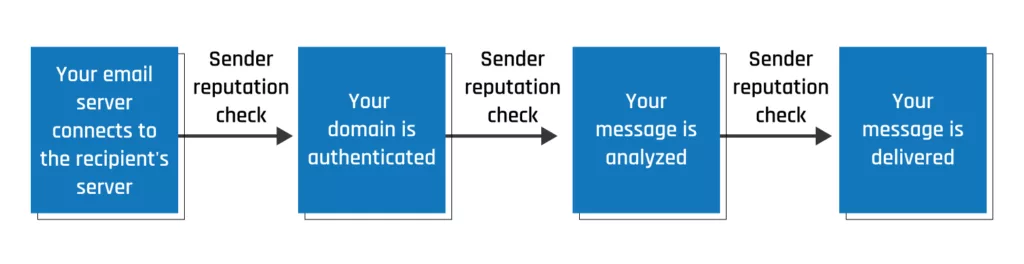
These 7 factors decide if your email gets read or rejected. ISPs like Gmail and Outlook don’t care how good your email copy is. They care about behavior. If you’re not following best practices, your reputation drops and so does your deliverability.
Let’s break down the seven biggest reputation influencers:
1. Bounce Rate
High bounce rates scream “bad sender.” If too many of your emails bounce (especially hard bounces from invalid addresses), it tells inbox providers you’re sending to a messy list.
- Aim for Less than a 2% bounce rate
- Fix it by Regular list cleaning and double opt-in signups.
2. Spam Complaints
Just one complaint per 1,000 emails can hurt you. When users hit “Mark as Spam,” it signals that you’re either irrelevant or untrusted.
- Keep your complaint rate under 0.1%
- Fix it by setting clear expectations and making unsubscribing easier than complaining.
3. Engagement Metrics
- Engaged users = trusted sender. ISPs reward emails that get opened, clicked, replied to, or forwarded. Lack of engagement? That’s a red flag.
- Boost it by sending personalized, segmented, high-value content.
4. Sending Volume Consistency
- Sudden spikes look spammy. Going from 1,000 emails a day to 50,000 overnight? You’ll trigger filters.
- Fix it by warming up your domain/IP gradually, especially on new campaigns.
5. List Quality
- Old or purchased lists = a death sentence. These lists often contain invalid emails, spam traps, and people who never opted in.
- Fix it by only emailing subscribers who actually want your content.
6. Blacklists
- If you’re listed, you’re blocked. Period ISPs consult real-time blacklists to decide if your domain or IP is suspicious.
- Fix it by Checking blacklists regularly via MxToolbox and resolving any issues ASAP.
7. Authentication Setup
- No SPF, DKIM, or DMARC = no trust. These records prove you are who you say you are. Without them, inboxes assume you’re a spammer or spoofed sender.
- Fix it by properly configuring all three in your DNS settings.
Key Considerations for Building a Strong Email Reputation
“Good reputations take time to build, but one spammy email can ruin it.” Sender reputation isn’t just something you fix once. It’s something you earn and protect with every email you send. Think of it like trust with a friend: slow to gain, easy to lose.
Want to keep your emails landing in inboxes (not spam folders)? Follow these non-negotiables:
Use Double Opt-In
Quality > Quantity
With double opt-in, subscribers confirm their email before joining your list. This prevents fake signups, typos, and uninterested users.
Warm Up New Domains and IPs Slowly
Start small, grow smart. Don’t blast 50K emails on Day 1. Gradually increase your sending volume over several weeks. Why? It signals to ISPs that you’re a real sender, not a spam bot.
Send Valuable, Expected Content
Permission is power. Your subscribers signed up for something, deliver on that promise. Provide content that informs, entertains, or solves their problems. Set expectations on your signup page about email frequency and content type.
Maintain a Consistent Sending Frequency
Inconsistency raises flags. If you disappear for months and suddenly send daily promos, ISPs get suspicious, and so do your users. Stick to a realistic, regular cadence that your audience expects.
Set up SPF, DKIM, and DMARC
No excuses, just do it. These three DNS records are your digital ID. Without them, inbox providers can’t verify you, and your emails are far more likely to be flagged.
Remove Unengaged Subscribers
Don’t send to ghosts. Inactive subscribers hurt your engagement rate, which hurts your sender score. If someone hasn’t opened in 60–90 days, consider a re-engagement campaign, or let them go. Make unsubscribing easy. It’s better than being marked as spam.
Use VMC
A Verified Mark Certificate (VMC) allows your logo to appear next to your email in the inbox, similar to the blue checkmark that signifies email verification. It doesn’t directly affect your reputation score. However, it changes perception, which in turn changes behavior. People trust what looks official. So, engagement goes up, which does impact your score.
This is subtle but important. Email deliverability is feedback-driven. Higher trust = more openness. More opens = better reputation. DigiCert VMC helps you start that loop.
How Your Email Reputation Impacts Deliverability?
“Poor reputation doesn’t just hurt your email, it kills your conversions.” You can have killer copy, beautiful design, and irresistible offers… but none of it matters if your emails don’t reach the inbox.
That’s the hidden danger of a bad sender reputation: it silently strangles your email ROI.
Let’s break down how this really plays out:
Your Emails Land in Spam Or Don’t Get Delivered at All
Yes, your emails may never reach anyone. Gmail and Outlook use sender reputation to decide where your email goes, or whether it gets blocked entirely. Bad score? You’re either:
- Dumped straight into spam
- Silently dropped with zero notice
ISPs Throttle or Block You
You become an untrusted sender. When your reputation drops, ISPs might:
- Delay your sends ( “greylisting”)
- Block large chunks of your emails
- Monitor your sends more aggressively
ROI Drops Due to Low Reach
Poor deliverability = fewer opens = fewer conversions. Let’s say your list has 10,000 contacts. If only 50% of those actually see your email, your potential revenue is instantly slashed in half.
You Waste Money on Email Tools Without Results
What’s the point of paying for premium tools if no one sees your emails?
You’re shelling out for fancy CRMs, analytics dashboards, and automation, but if your emails don’t get delivered, you’re pouring money down the drain.
10 Actionable Tips to Improve Your Sender Reputation
“Want better inbox rates by this time next week? Start here.” A poor sender reputation isn’t a life sentence. With a few smart tweaks and habits, you can start repairing your score and get more emails into the inbox where they belong.
Let’s dive into the exact steps you should take right now:
Authenticate Your Domain (SPF, DKIM, DMARC)
Think of these as your email passport. Without proper authentication, inbox providers won’t trust you.
- SPF validates who can send emails from your domain.
- DKIM verifies your emails haven’t been tampered with.
- DMARC ties them together and tells ISPs on how to handle unauthenticated mail.
Read Also: What is DMARC? Benefits, Implementation and How to Set It Up for Your Organization?
Use Double Opt-In for Cleaner Lists
One confirmation email = a clean, engaged list.
It keeps bots, fake addresses, and uninterested individuals off your list and boosts your engagement metrics from the start.
Stop Buying Email Lists (Seriously)
It’s tempting, but don’t. These lists are filled with stale, unengaged, or downright fake contacts. And yes, sending to them can destroy your sender reputation overnight.
Avoid Spammy Subject Lines and Content
Words like “FREE!!!” or “Act Now” can trigger spam filters. Instead, focus on value-driven, human-sounding subject lines and avoid all caps, excessive exclamation points, or misleading content.
Segment Your List for Better Targeting
Not everyone wants the same message. Segment your list by user behaviour, interest, or demographics, and send tailored content.
Remove Inactive Subscribers Regularly
Hanging on to ghost subscribers hurts your metrics. Set a policy (e.g., remove anyone who hasn’t opened in 90 days), or run a re-engagement campaign first.
Monitor Your Sender Reputation Using Tools
Stay proactive, not reactive. Use:
- Google Postmaster Tools
- SenderScore.org
- Talos Intelligence
Send Consistently (No Sudden Spikes)
Going from 0 to 100,000 sends overnight? That’s a red flag. Stick to a steady schedule. Sudden volume spikes signal spam behavior to the mail provider.
Warm Up New Domains/IPs Gradually
Just bought a new domain or IP? Treat it gently. Start with low volume, sending to your most engaged contacts. Slowly ramp up over weeks to build trust.
Make Unsubscribing Easy, Don’t Hide the Button
If users can’t find your unsubscribe link, they’ll mark you as spam. Every complaint hurts your score. An easy opt-out is better than a silent reputation killer.
Conclusion
Your email list is only as powerful as your reputation. Even if your content is amazing, a weak sender reputation will bury it in the spam folder, where it’ll never see the light of day. But here’s the good news: improving your reputation isn’t rocket science. It’s about consistent habits, smart practices, and respecting your subscribers.
Start small, authenticate your domain, clean your list, monitor your metrics, and you’ll see a massive difference in your open rates, engagement, and ROI. Remember, inbox placement is earned, not given. We offer a wide range of email security solutions, review and take as per your requirements.