
What is BIMI?
BIMI, which stands for Brand Indicators for Message Identification, is an email specification that gives brands the ability to display their logo next to their emails when they appear in the recipients’ inboxes. It is a visual authentication of email, as well as making brands more recognizable and raising awareness.

You could think of BIMI as the email equivalent of a verified profile picture. BIMI begins with either SPF or DKIM, and if you have DMARC, there are even more protections, indicating that only the legitimate senders can display this representation of your brand.
Benefits of Brand Indicators for Message Identification
BIMI provides several advantages for organizations implementing it:
Enhanced Brand Recognition
Greater brand identity roles are fulfilled, and BIMI enables images to be displayed in recipients’ inboxes, ensuring your brand remains consistent and easily identifiable. There is a high level of trust among email users in messages received from recognizable logos.
Improved Email Security
Higher levels of authentication than only DMARC are delivered via the logo; you can count on reduced phishing attacks and email spoofing.
Increased Email Engagement
Users and organizations who use identifiable logos in their emails provide tremendous amounts of visual stimuli- their messages become more recognizable and enticing to open.
Improved Deliverability
While it won’t affect deliverability positively as a measured factor, BIMI can improve it indirectly.
Implementing strong email authentication standards (the requirement for BIMI) demonstrates to mailbox providers that you are a legitimate sender, which, in turn, builds your email sender reputation and mitigates the chance of delivering spam.
Better Trust and Confidence
A verified logo can make a well-defined and identified brand even more trustworthy. If emails are authenticated and properly identified, recipients will generally have stronger trust levels.
Stronger Competition
BIMI can deliver the huge threat of making your emails more attractive and more legitimate than the unverified, unbranded emails of a competitor.
How BIMI Works?

With BIMI, trust incorporates a blend of DNS records, email authentication, and a verified logo file.
The general description goes as follows:
Email Authentication (SPF, DKIM, DMARC)
BIMI stands upon a very stout email authentication. The sender domain needs to have a valid SPF, DKIM, and DMARC in place.
A DMARC policy execution of p=quarantine or p=reject is a must to ensure that emails that fail sender authentication are either not delivered or quarantined.
Also Read: What is DMARC Fail? How to Know and Fix DMARC Failure?
Verified Mark Certificate (VMC)
VMC is a digital certificate that proves your legal title to the logo you chose to display. The certificate authority (CA) issues the Verified Mark Certificate after performing its due diligence in verifying your brand identity.
It’s not an absolute necessity all the time; however, some mailbox providers, Gmail being one among them, require VMC to make BIMI operational.
Also Read: How to Trademark Your Brand Logo to Qualify for VMC?
Logo Creation
Your logo shall be in SVG (Scalable Vector Graphics) format. And your logo must be square and in compliance with the rules established by the BIMI Group.
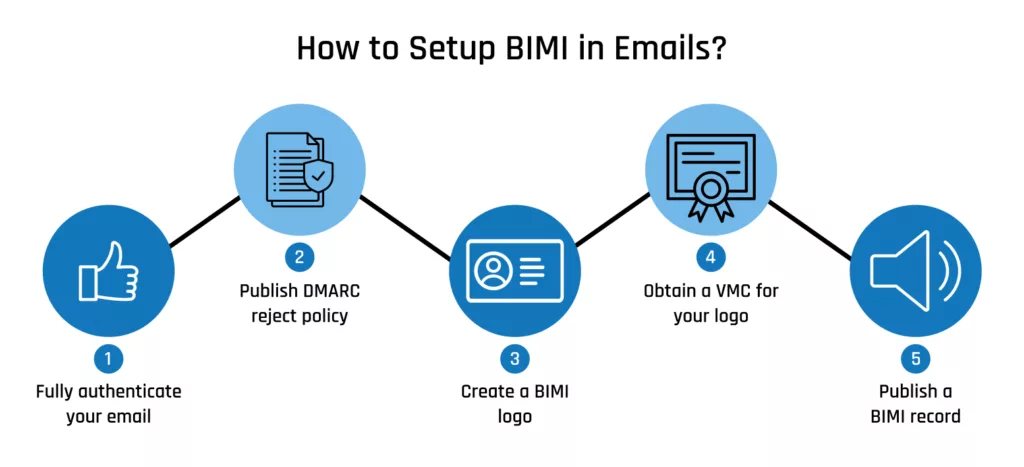
Setting the DNS Records
Now you must generate a TXT record under your domain’s DNS setup. This record will contain the BIMI record indicating the location of your SVG logo file on the internet.
The BIMI record is made up of a version number of the BIMI specification (which is optional), the path to your SVG logo file, and your VMC file (also optional).
The BIMI record type as seen in the example below:
default._bimi.yourdomain.com. IN TXT "v=BIMI1; l=https://yourdomain.com/logo.svg; a=https://yourdomain.com/vmc.pem;"v=BIMI1: Specifies the BIMI version.
l=https://yourdomain.com/logo.svg: Specifies the URL of your SVG logo file.
a=https://yourdomain.com/vmc.pem (Optional): Specifies the URL of your VMC file.
Mailbox Provider Implementation
Mailbox providers to whom BIMI may apply will seek to verify your BIMI record within the DNS of your domain.
Also Read: How to Implement Brand Indicators for Message Identification to Display Brand Logo on Email?
Provided that the record is discovered, and the email is going through the authentication validation (SPF, DKIM, DMARC), the recipient email box provider will append your logo next to your email message in the recipient’s inbox.
Supported Mailbox Providers
BIMI is increasing in adoption; however, not all mailbox providers currently support it. Some of the key providers who are currently BIMI supportive are:
- Gmail: Gmail has been an early adopter of BIMI and needs a VMC to enable it to display the logo.
- Yahoo Mail: Yahoo Mail also supports BIMI.
- AOL Mail: AOL, owned by Yahoo, can support BIMI.
- Fastmail: Fastmail has a robust support of email standards and supports BIMI.
- Apple Mail (iOS 16+, macOS Ventura+): Apple now supports BIMI in its Mail app as of iOS 16 and macOS Ventura and later.
Also Read: How to Display your Logo in the Inbox with Apple Branded Mail?
Keep in mind that the support level for BIMI may also vary depending on the mailbox provider you are using and the email client used by the recipient. Testing your BIMI configuration is a good practice to ensure that your logo displays correctly on different platforms.
Protect Your Email Identity with Mark Certificates for BIMI Success
In order to reap the ultimate advantages of BIMI, such as enhanced brand visibility, enhanced deliverability, and enhanced email trust, a DigiCert Verified Mark Certificate (VMC) or Common Mark Certificate (CMC) must be acquired.
These certificates authenticate your brand logo and inform the mailbox providers we support, such as Gmail, Yahoo, Apple Mail, and more, that your emails are authentic, verified, and secure.